Family members
Another parent, a grandparent or anyone else who helps with practice can keep the same diary with you. Each adult signs in with their own email address, on their own phones and tablets, and everyone sees the same notebooks, practice and weeks.
The family's adults are in Settings, under Family members.
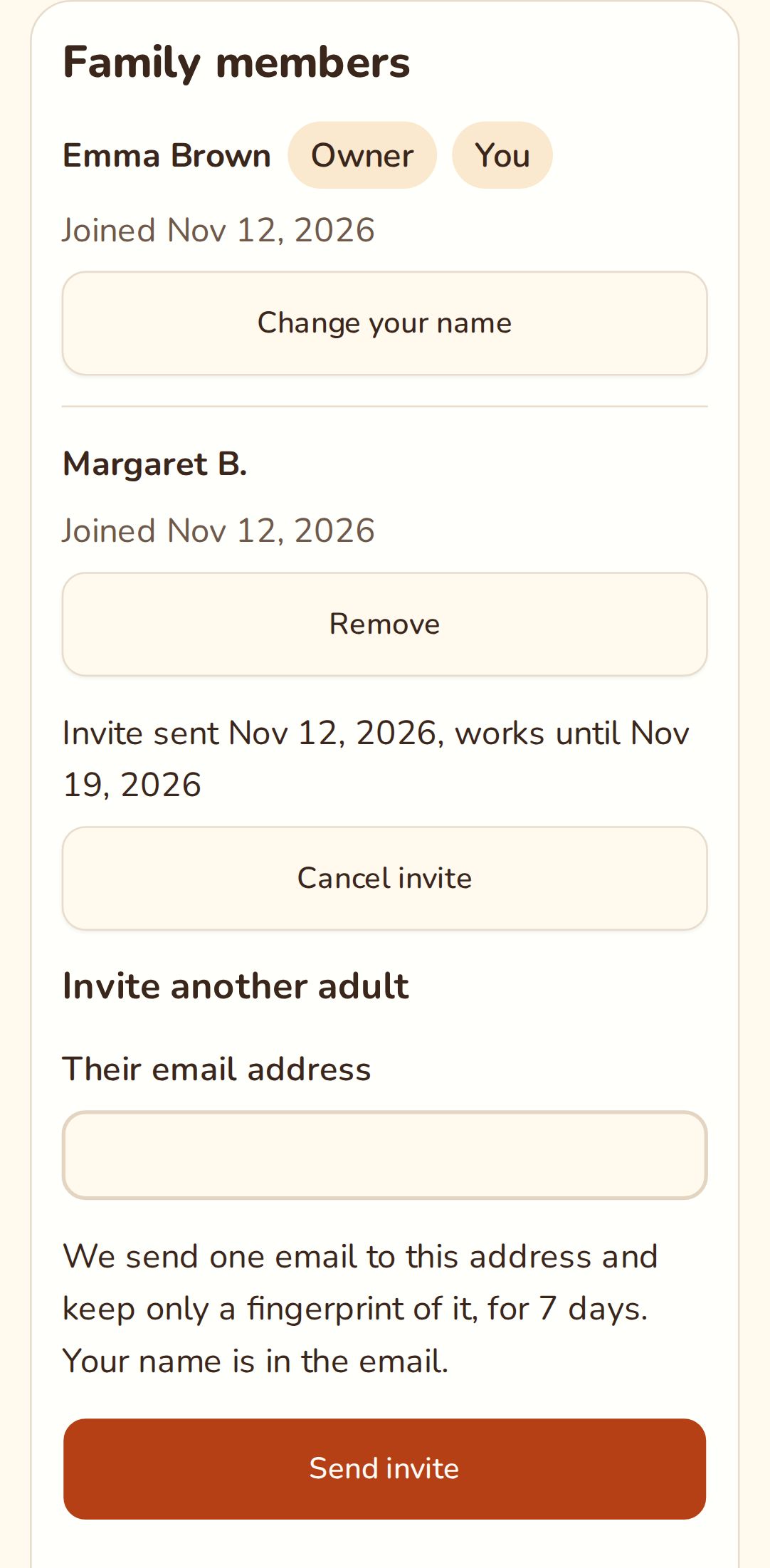
Invite another adult
- Under Family members, write their address in Their email address and tap Send invite.
- Check the address and tap Send invite again.
If you haven't given your name yet, the card asks for it first, under Your name, as your family knows you. Your name is in the invite email, so they know who it's from.
The card shows the invite and the date it works until. It works for 7 days, and Cancel invite ends it at once. Invite only an address you trust: whoever reads that inbox can join the diary.
If the email doesn't arrive, ask them to look in their spam folder. You can also send the invite again by writing the address once more: the new one replaces the old. You can send at most 3 invites to one address in a day, and your family 5 in a day. A family's diary can have 6 adults, counting invites not yet accepted.
Join with an invite
This part is for the person who got the invite.
The invite email's subject names the adult who invited you. If you don't know them, ignore it: the invite ends by itself.
- In the email, tap Join the diary. Do it on the phone, tablet or computer you'll use.
- Write your name as the family knows you and the email address the invite was sent to, tick I'm 18 or over and tap Send me a code.
- A 6-digit code comes to the same address. Keep this page open while you read the email, then type the code in Code from the email and tap Continue.
You're now in the family's diary and see the children.
The code works once, for 15 minutes, and only on the page where you asked for it. You can read it on your phone and type it on your computer. If nothing has arrived after a few minutes, look in the spam folder, then tap Send a new code. On your other devices, sign in with the same address: a new code comes to it each time.
If you already have an account with this address and no children in it, it moves to this family. If your account already keeps a diary of its own, it can't join: delete it first under Delete my account in Settings, then open the invite again. Only adults can join a family's diary.
If you're already signed in with the invited address, the page doesn't ask for it: check your name, tick I'm 18 or over and tap Join.
What each adult can do
Every adult in the family can write notebook pages, start kid mode, log and confirm practice, change the settings and download a copy of the data. The kid mode PIN belongs to each device, so each adult chooses one on their own devices.
Only the owner can invite and remove adults, cancel invites, and delete a child's profile or an instrument, so no one else can erase a child's practice history. Anyone can delete a single page, task or practice.
Each adult changes their own name on the card with Change your name. Everyone in the family sees the others' names, who is the Owner and when each joined.
Remove someone
The owner taps Remove under the adult's name and confirms. The diary disappears from all their devices the next time each one connects, and their account is deleted, since it has no diary left. What they wrote stays in the diary. To bring them back, invite them again.
When an adult leaves
An adult who isn't the owner leaves by deleting their account under Delete my account in Settings. The diary stays with the family. More in Your data.
When the owner deletes their account, the diary stays with the others, and the adult who joined first becomes its owner. Invites the owner sent that haven't been accepted yet end, and the new owner can send new ones.
What we keep
The invite email has your name in it. Of the address you invite, we keep only a fingerprint, not the address itself, until the invite is accepted or cancelled, and for 7 days at most. The name the invited adult types waits with their code and is deleted within two hours if the code isn't used. More in the privacy policy.